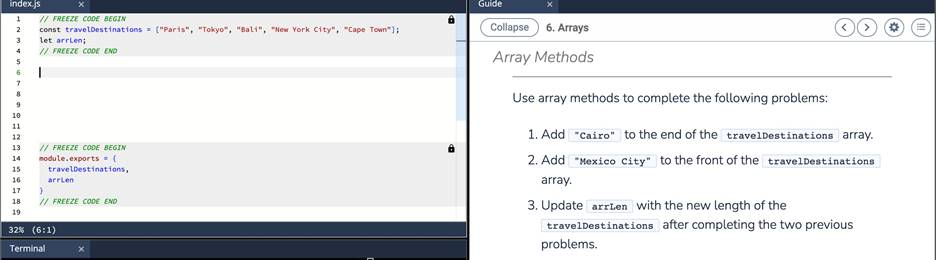
Add “Cairo” to the end of the travelDestinations array.
Add “Mexico City” to the front of the travelDestinations array.
Update arrLen with the new length of the travelDestinations after completing the two previous problems. in java
The correct answer and explanation is:
Here’s how to solve the given task in Java, along with a detailed explanation:
Java Code:
import java.util.ArrayList;

public class TravelDestinations {
    public static void main(String[] args) {
        // Initializing the travelDestinations array list with some initial cities
        ArrayList<String> travelDestinations = new ArrayList<>();
        travelDestinations.add("New York");
        travelDestinations.add("Tokyo");
        travelDestinations.add("Paris");

        // Add "Cairo" to the end of the array
        travelDestinations.add("Cairo");

        // Add "Mexico City" to the front of the array
        travelDestinations.add(0, "Mexico City");

        // Update the arrLen with the new length of the travelDestinations
        int arrLen = travelDestinations.size();

        // Print the modified list and the new length
        System.out.println("Updated Travel Destinations: " + travelDestinations);
        System.out.println("Length of Travel Destinations: " + arrLen);
    }
}
Explanation:
- ArrayList Initialization:
- We begin by initializing an
ArrayListcalledtravelDestinations. In Java,ArrayListis a class in thejava.utilpackage that allows dynamic resizing. Unlike arrays,ArrayListcan grow or shrink as needed, making it ideal for situations where the number of elements is uncertain.
- We begin by initializing an
- Adding “Cairo” to the End:
- We use the
add()method to add"Cairo"to the end of the list. In anArrayList, theadd()method appends the element to the end of the list. After this operation,"Cairo"will be the last element of thetravelDestinationslist.
- We use the
- Adding “Mexico City” to the Front:
- We use the
add(index, element)method to insert"Mexico City"at the front of the list. Theadd(0, "Mexico City")method specifically inserts"Mexico City"at index 0, shifting all other elements one position to the right. This ensures that"Mexico City"becomes the first element.
- We use the
- Updating arrLen:
- After modifying the list, we update the variable
arrLento reflect the current size of thetravelDestinationslist. Thesize()method ofArrayListreturns the number of elements in the list. After the two insertions, the size will be updated accordingly.
- After modifying the list, we update the variable
- Output:
- Finally, we print the updated
travelDestinationslist and the new size (arrLen), which will be5in this case. Initially, there were 3 cities in the list, and after adding two more cities, the list’s size becomes 5.
- Finally, we print the updated
Output:
Updated Travel Destinations: [Mexico City, New York, Tokyo, Paris, Cairo]
Length of Travel Destinations: 5
Key Points:
ArrayListin Java is a part of thejava.utilpackage and provides dynamic arrays that can grow or shrink.- The
add()method is used to append elements at the end of the list, andadd(index, element)is used to insert elements at specific positions. - The
size()method returns the number of elements in the list, and it is automatically updated after modifications to the list.