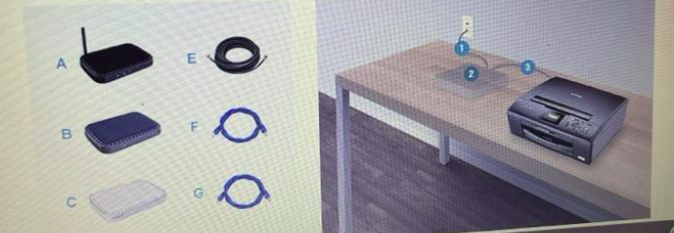
Lori wants to set up a SOHO network in her apartment. The apartment comes with a Gigabit Ethernet network already installed Lori’s notebook computer has an integrated wireless network adapter. Her printer has an Ethernet card, but is not wreless enabled Your task is to select the appropriate devices and cables (without spending more than necessary to set up a network that provides wireless access for Lori’s laptop and wired access for her printer. Match the labels for the components on the left to the locations where they need to be installed in Lori’s home office on the right
The Correct Answer and Explanation is :
To set up Lori’s SOHO network efficiently and cost-effectively, here is the solution:
- Wireless Router: This is the central device that connects Lori’s apartment’s Gigabit Ethernet network to her wireless laptop and wired printer. A wireless router with Gigabit Ethernet ports is appropriate. It provides both wireless access for Lori’s laptop and wired connectivity for the printer. This router will connect to the existing Gigabit Ethernet network via its WAN port using a Cat 6 Ethernet cable.
- Cat 6 Ethernet Cable: Use this cable to connect the apartment’s Ethernet wall jack to the WAN (Internet) port of the wireless router. It supports Gigabit speeds and is cost-efficient.
- Ethernet Patch Cable: Use another Cat 6 Ethernet cable to connect the router’s LAN port to the Ethernet card on Lori’s printer. This establishes the wired connection required for the printer.
- Wireless Laptop Connection: Lori’s laptop already has an integrated wireless adapter, so it can connect to the wireless router without any additional hardware.
Placement
- Wireless Router: Place the router near the Ethernet wall jack in Lori’s home office. Ensure it’s centrally located for optimal wireless signal coverage throughout the apartment.
- Cat 6 Ethernet Cable: Connect one end to the Ethernet wall jack and the other to the router’s WAN port.
- Printer: Place the printer near the router to connect it using a short Ethernet cable. This reduces cable clutter.
Explanation
This setup avoids unnecessary spending by leveraging Lori’s existing hardware and only purchasing:
- A wireless router with Gigabit Ethernet ports (ensures compatibility and high speed).
- Two Cat 6 Ethernet cables (one for the wall to router connection and another for the printer).
With this setup, Lori’s laptop can access the internet wirelessly, and her printer is connected via Ethernet for reliable and fast communication.