The Correct Answer and Explanation is:
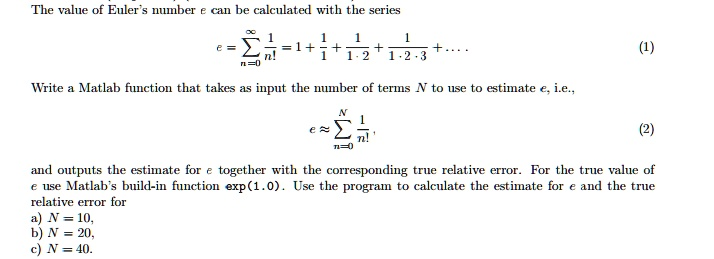
To calculate Euler’s number eee using the series expansion, we use the following formula:e=∑n=0∞1n!e = \sum_{n=0}^{\infty} \frac{1}{n!}e=n=0∑∞n!1
This series converges quickly, so we can approximate eee by summing the first NNN terms. The true value of eee is exp(1.0)\exp(1.0)exp(1.0) in MATLAB, and we can compute the relative error as follows:True Relative Error=∣eapprox−etrue∣etrue\text{True Relative Error} = \frac{|e_{\text{approx}} – e_{\text{true}}|}{e_{\text{true}}}True Relative Error=etrue∣eapprox−etrue∣
Now, let’s write the MATLAB function that will compute the estimate of eee for a given NNN and the corresponding relative error.
MATLAB Code:
matlabCopyEditfunction [e_estimate, true_rel_error] = estimate_e(N)
    % Function to estimate Euler's number e using the first N terms
    % of the series and calculate the true relative error

    % Initialize the estimate
    e_estimate = 0;

    % Sum the first N terms of the series
    for n = 0:N-1
        e_estimate = e_estimate + 1/factorial(n);
    end

    % Calculate the true value of e using exp(1.0)
    e_true = exp(1.0);

    % Calculate the true relative error
    true_rel_error = abs(e_estimate - e_true) / e_true;

    % Display results
    disp(['Estimate of e for N = ', num2str(N), ' : ', num2str(e_estimate)]);
    disp(['True Relative Error: ', num2str(true_rel_error)]);
end
Explanation:
- The function
estimate_e(N)takes an integer NNN, which specifies the number of terms to be used in the series. - The loop sums the terms of the series 1n!\frac{1}{n!}n!1 for n=0n = 0n=0 to N−1N-1N−1.
- The true value of eee is computed using
exp(1.0)in MATLAB. - The relative error is calculated using the formula for true relative error.
Example for different values of NNN:
You can run the function for different values of NNN as follows:
a) N=10N = 10N=10:
matlabCopyEdit[e_10, error_10] = estimate_e(10);
b) N=20N = 20N=20:
matlabCopyEdit[e_20, error_20] = estimate_e(20);
c) N=40N = 40N=40:
matlabCopyEdit[e_40, error_40] = estimate_e(40);
The function will display the estimated value of eee along with the corresponding true relative error for each NNN.