The Correct Answer and Explanation is:
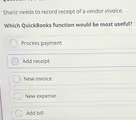
The correct answer is Add bill.
Here is a detailed explanation of why this is the correct choice and why the other options are incorrect.
In accounting and within QuickBooks, a “vendor invoice” is a document you receive from a supplier requesting payment for goods or services they have provided to you. The key aspect is that you are not paying it immediately but are recording the obligation to pay it in the future. This process creates a liability on your books, specifically in an account called Accounts Payable.
The Add bill function in QuickBooks is designed precisely for this scenario. When you use “Add bill,” you enter the vendor’s name, the date of the invoice, the payment terms, the due date, and the specific expense accounts or items the invoice covers. This action correctly records the expense in the proper period and simultaneously creates a corresponding entry in Accounts Payable. This provides an accurate picture of your company’s short term debts and helps you manage cash flow by tracking when bills are due.
Let’s review the other options to understand why they are unsuitable.
- New invoice is the function used to bill your own customers for services or products you have sold. It creates Accounts Receivable, which is money owed to your business, the opposite of what is needed here.
- New expense is used to record purchases that are paid for at the time of the transaction, such as using a company credit card, debit card, or cash. This function does not create an Accounts Payable entry because there is no future payment to track.
- Process payment is the step you would take after a bill has already been entered into the system. It is the function for issuing a check, electronic payment, or credit card payment to a vendor to settle an open bill.
- Add receipt is a feature for capturing and attaching images of receipts for expenses that have already been paid, often used in conjunction with the “New expense” function to provide documentation. It does not create a bill to be paid later.