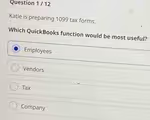
The Correct Answer and Explanation is:
The correct answer is Vendors.
Explanation
The most useful QuickBooks function for preparing 1099 tax forms is the Vendors section. This choice is correct because 1099 forms, specifically the 1099-NEC (Nonemployee Compensation), are used to report payments made to independent contractors and other non-employee service providers. In accounting software like QuickBooks, these individuals and businesses are classified and managed as vendors.
The process begins within the Vendor Center. When a business engages a contractor, a vendor profile is created for them. A critical step in this setup is to collect their W-9 form and enter their tax identification number (such as a Social Security Number or Employer Identification Number) into their QuickBooks profile. There is typically a specific checkbox to mark the vendor as eligible for a 1099.
Throughout the year, every payment made to that contractor is recorded and categorized under their vendor profile. QuickBooks tracks these payments. At the end of the tax year, QuickBooks uses this accumulated data to simplify the 1099 preparation process. It can generate reports showing which vendors met the payment threshold (currently $600 or more) and can often populate the 1099-NEC forms automatically, making filing significantly easier.
The other options are incorrect for specific reasons. The Employees function is used exclusively for W-2 employees on the company’s payroll; confusing contractors with employees has serious legal and tax implications. The Tax center is generally for managing sales tax or the company’s own payroll tax liabilities. The Company function contains general business settings and information, not the transactional data needed for individual contractor reporting. Therefore, the Vendor function is the essential hub for all 1099-related activities.