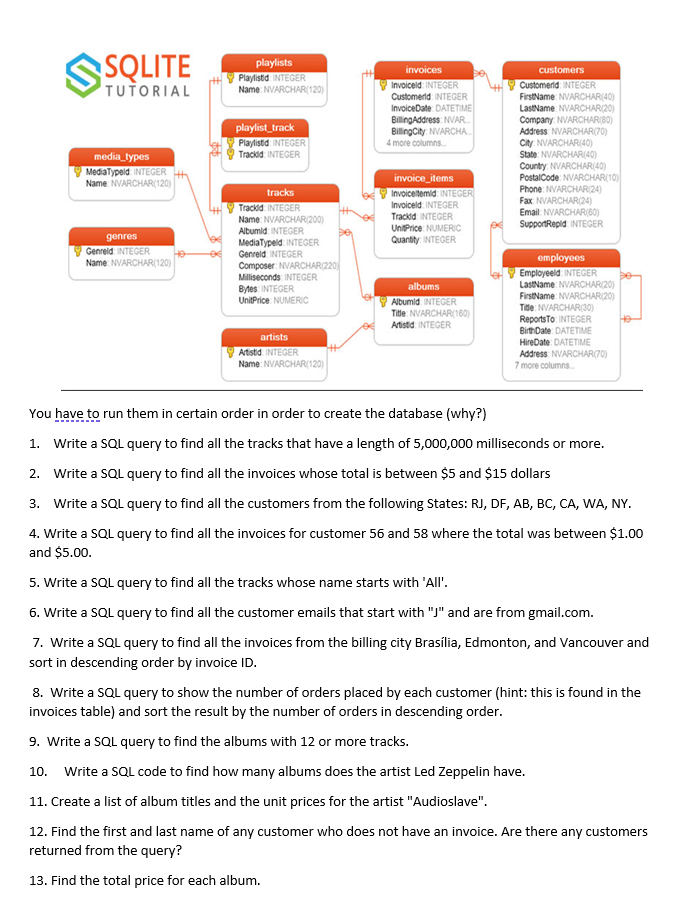
Write a SQL query to find all the invoices for customer 56 and 58 where the total was between $1.00 and $5.00. 5. Write a SQL query to find all the tracks whose name starts with ‘All’. 6. Write a SQL query to find all the customer emails that start with “J” and are from gmail.com. 7. Write a SQL query to find all the invoices from the billing city BrasÃÂlia, Edmonton, and Vancouver and sort in descending order by invoice ID. 8. Write a SQL query to show the number of orders placed by each customer (hint: this is found in the invoices table) and sort the result by the number of orders in descending order. 9. Write a SQL query to find the albums with 12 or more tracks.
The Correct Answer and Explanation is :
Here are the SQL queries and explanations for each of your tasks:
Queries:
- Tracks with a length of 5,000,000 milliseconds or more:
   SELECT *
   FROM tracks
WHERE milliseconds >= 5000000;- Invoices with total between $5 and $15:
   SELECT *
   FROM invoices
WHERE total BETWEEN 5 AND 15;- Customers from specific states:
   SELECT *
   FROM customers
WHERE state IN ('RJ', 'DF', 'AB', 'BC', 'CA', 'WA', 'NY');- Invoices for customers 56 and 58 with total between $1.00 and $5.00:
   SELECT *
   FROM invoices
   WHERE customer_id IN (56, 58)
AND total BETWEEN 1.00 AND 5.00;- Tracks whose name starts with ‘All’:
   SELECT *
   FROM tracks
WHERE name LIKE 'All%';- Customer emails starting with ‘J’ and from Gmail:
   SELECT *
   FROM customers
WHERE email LIKE 'J%@gmail.com';- Invoices from specific cities, sorted descending by invoice ID:
   SELECT *
   FROM invoices
   WHERE billing_city IN ('Brasília', 'Edmonton', 'Vancouver')
ORDER BY invoice_id DESC;- Number of orders per customer, sorted descending:
   SELECT customer_id, COUNT(*) AS order_count
   FROM invoices
   GROUP BY customer_id
ORDER BY order_count DESC;- Albums with 12 or more tracks:
   SELECT album_id
   FROM tracks
   GROUP BY album_id
HAVING COUNT(*) >= 12;- Number of albums by Led Zeppelin:
SELECT COUNT(*) AS album_count FROM albums JOIN artists ON albums.artist_id = artists.artist_id WHERE artists.name = 'Led Zeppelin'; - List of album titles and unit prices for Audioslave:
SELECT albums.title, tracks.unit_price FROM albums JOIN artists ON albums.artist_id = artists.artist_id JOIN tracks ON albums.album_id = tracks.album_id WHERE artists.name = 'Audioslave'; - Customers without an invoice:
SELECT first_name, last_name FROM customers WHERE customer_id NOT IN (SELECT DISTINCT customer_id FROM invoices); - Total price for each album:
sql SELECT albums.title, SUM(tracks.unit_price) AS total_price FROM albums JOIN tracks ON albums.album_id = tracks.album_id GROUP BY albums.title;
Explanation:
- Why order matters: The database must be set up in the correct sequence to respect dependencies. For example, tracks depend on albums, and albums depend on artists. If you attempt to query or insert data without establishing these relationships, errors may occur.
- Query breakdown: Each SQL query demonstrates common database operations:
- Filtering with
WHEREclauses (e.g., invoices, tracks). - Aggregating data using
GROUP BYandHAVINGfor counts or sums. - Using joins to connect related tables for more complex queries (e.g., albums and artists).
- Sorting results with
ORDER BYfor clarity. - Insight: These queries highlight various SQL features, like filtering, sorting, aggregating, and joining, to extract meaningful data from a relational database efficiently. Queries like #8 and #13 showcase the power of SQL in summarizing and analyzing datasets for actionable insights.