Identify the the output of the following code fragment print(‘PYnative’, end=’//’) print(‘ is for’, end=’//’) print(‘Python Lovers’, end=’//’) PYnative / is for / Python Lovers / PYnative // is for // Python Lovers // PYnative // is for // Python Lovers// PYnative / is for / Python Lovers
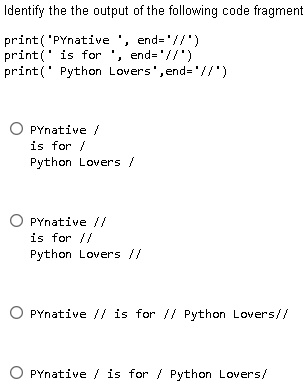
The Correct Answer and Explanation is:
The correct output of the given Python code fragment is:
PYnative // is for // Python Lovers//
Explanation:
In Python, the print() function is used to display output. By default, it adds a newline (\n) after each statement. However, the end parameter modifies this behavior, allowing custom endings instead of newlines.
Step-by-step breakdown:
print('PYnative', end='//')- This prints PYnative, followed by // instead of a newline.
print(' is for', end='//')- Since there was no newline, this directly appends is for, followed by //.
print('Python Lovers', end='//')- This continues appending Python Lovers, followed by //.
Since all print() statements use '//' as the end parameter, they concatenate into a single line without breaks. The final output reflects this continuous sequence.
Why the answer is not other choices:
- “PYnative / is for / Python Lovers /” is incorrect because
'//'is used, not'/'. - “PYnative // is for // Python Lovers //” is close but has an extra space at the end.
- “PYnative / is for / Python Lovers” is incorrect for the same reason as the first.
Understanding the end parameter is useful for controlling console formatting, preventing automatic newlines, and structuring outputs cleanly.