Calculator View Edit Help – X 0 MC MR MS M+ M- ? CE C ± ? 7 8 9 / % 4 5 6 * 1/x 1 2 3 – = 0 . +
The Correct Answer and Explanation is:
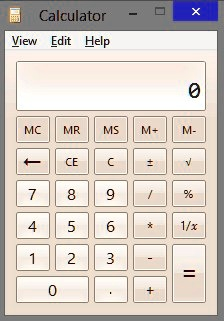
Based on the calculator image and the list you provided, the two missing symbols are:
Backspace and Square Root
Explanation
The calculator shown in the image is the standard version from an older Windows operating system, most notably Windows 7. The buttons you marked with question marks correspond to two distinct and common functions: Backspace and Square Root.
The first missing symbol, located to the left of the CE button, is the Backspace button. It is visually represented by a left-pointing arrow (←). This function is essential for correcting minor input errors. When you are typing a number, pressing the Backspace key removes the last digit you entered. This is different from the C (Clear) and CE (Clear Entry) buttons. The CE button erases the entire number you are currently typing, while the C button resets the whole calculation. Backspace offers a more precise way to fix a single mistake without having to re-enter the entire number. For instance, if you intended to type 582 but accidentally typed 583, you would press Backspace once to remove the 3, and then you could enter the correct digit, 2.
The second missing symbol, located to the right of the plus/minus (±) button, is the Square Root button. It is represented by the radical symbol (√). This is a unary mathematical operation, meaning it acts on a single number. Its purpose is to calculate the square root of the number currently shown on the display. The square root of a number ‘x’ is a value ‘y’ such that y multiplied by itself equals x. For a practical example on this calculator, if you were to type the number 25 and then press the square root key, the display would show 5, because 5 times 5 equals 25. This function is a fundamental feature, even on basic calculators, bridging the gap between simple arithmetic and more advanced scientific calculations.