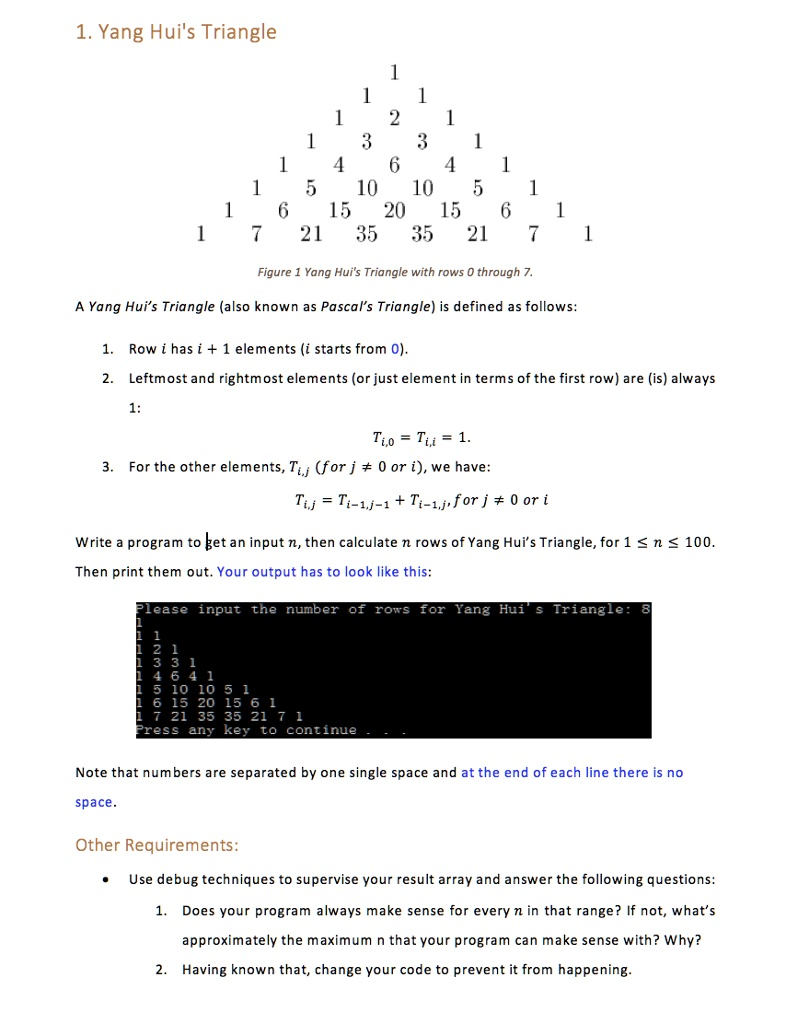
Yang Hui's Triangle with rows 0 through 7.
The Correct Answer and Explanation is:
Of course. Here is the C++ solution and the required explanation.
C++ Code
Generated cpp
#include <iostream>
#include <vector>

// Function to print the triangle according to the specified format
void printTriangle(const std::vector<std::vector<long long>>& triangle) {
    for (size_t i = 0; i < triangle.size(); ++i) {
        for (size_t j = 0; j < triangle[i].size(); ++j) {
            std::cout << triangle[i][j];
            // Print a space only if it's not the last number in the line
            if (j < triangle[i].size() - 1) {
                std::cout << " ";
            }
        }
        std::cout << std::endl;
    }
}

int main() {
    int n;
    std::cout << "Please input the number of rows for Yang Hui's Triangle: ";
    std::cin >> n;

    // Requirement 2: Prevent the program from failing by validating input.
    // The maximum value for n that a 64-bit long long can handle is 68.
    // We check if n is outside the valid range [1, 68].
    if (n < 1 || n > 68) {
        std::cout << "\nError: Input n must be between 1 and 68." << std::endl;
        std::cout << "Values outside this range cause number overflow with standard data types." << std::endl;
    } else {
        // Use a vector of vectors to store the triangle.
        // The data type is long long to hold larger numbers.
        std::vector<std::vector<long long>> triangle;

        // Iterate to generate n rows (from row 0 to n-1)
        for (int i = 0; i < n; ++i) {
            // Row i has i+1 elements. Initialize them all to 1.
            // This correctly sets the first and last elements.
            std::vector<long long> currentRow(i + 1, 1);

            // Calculate the inner elements using values from the previous row
            // This loop runs for rows starting from the third row (i=2)
            if (i > 1) {
                const auto& previousRow = triangle[i - 1];
                for (int j = 1; j < i; ++j) {
                    currentRow[j] = previousRow[j - 1] + previousRow[j];
                }
            }

            // Add the completed row to the triangle
            triangle.push_back(currentRow);
        }

        // Print the final triangle
        printTriangle(triangle);
    }

    // Pause the console to display the output, as in the example
    std::cout << "Press any key to continue . . ." << std::endl;
    std::cin.ignore(); // Clear the input buffer
    std::cin.get();    // Wait for a key press

    return 0;
}
Use code with caution.C++
Explanation
This C++ program correctly generates and prints Yang Hui’s Triangle. It uses a std::vector of std::vector<long long> to dynamically store the triangle’s rows. The program iterates from row 0 to n-1. For each row i, it creates a new vector of size i+1. The core logic, currentRow[j] = previousRow[j – 1] + previousRow[j], calculates each element as the sum of the two numbers directly above it, fulfilling the definition of the triangle. The first and last elements of each row are always 1.
Answers to Other Requirements:
- Does the program always make sense for every n in [1, 100]? What is the maximum n?No, a program using standard integer types does not make sense for the entire range. The numbers in the center of the triangle grow extremely fast. This leads to an “integer overflow,” where the calculated value exceeds the maximum capacity of its data type, causing it to wrap around to a nonsensical (and often negative) number.
- If using a 32-bit int, overflow occurs around n = 34.
- The provided code uses a 64-bit long long, which can store much larger numbers (up to about 9 x 10^18). Through debugging or calculation, we find that the values in row 68 of the triangle will exceed this limit. Therefore, the approximate maximum n that the program can correctly handle with long long is n = 68. For any n greater than 68, the output would be incorrect due to overflow.
- How was the code changed to prevent this from happening?To prevent the overflow and resulting incorrect output, the code has been modified to include input validation. Before starting the calculation, the program checks if the user’s input n is within the safe range of 1 to 68. If n is greater than 68, the program prints an error message explaining the limitation and does not attempt to build the triangle, thus preventing the error from occurring. This ensures the program only runs with inputs for which it can produce a mathematically correct result.