The Correct Answer and Explanation is:
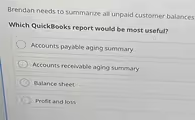
The correct answer is Accounts receivable aging summary.
An Accounts receivable aging summary is the most useful QuickBooks report for Brendan because it is specifically designed to list all customers who owe the company money and to categorize their unpaid balances based on how long the invoices have been outstanding. This report provides a clear and detailed overview of all unpaid customer invoices, making it the ideal tool for managing collections.
The “accounts receivable” part of the name refers to the money that is owed to a business by its customers for goods or services provided on credit. The “aging” component is crucial; it sorts these unpaid invoices into columns, typically including categories like Current (not yet due), 1 to 30 days past due, 31 to 60 days past due, and so on. This format allows Brendan to quickly identify which customers are late with their payments and prioritize follow up actions. He can see not just the total amount owed by each customer but also the severity of the delinquency. This level of detail is essential for effective cash flow management and for assessing the potential risk of bad debt.
The other options are not suitable for this specific task. An Accounts payable aging summary shows the opposite information: the money the company owes to its vendors and suppliers. A Balance sheet provides a high level snapshot of a company’s financial position, and while it does show a single total for accounts receivable as an asset, it does not break down the balances by individual customer or age. Finally, a Profit and loss statement reports on a company’s revenues and expenses over a period to show its profitability; it does not track the status of unpaid invoices. Therefore, the Accounts receivable aging summary is the only report that provides the necessary detail to summarize all unpaid customer balances effectively.