The Correct Answer and Explanation is:
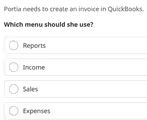
The correct answer is Sales.
To create an invoice in QuickBooks, Portia should use the Sales menu. This choice is correct because an invoice is a primary document in the business sales cycle. It is a formal request for payment sent to a customer after goods or services have been delivered. QuickBooks organizes its functions based on logical business workflows, and anything related to selling to customers and receiving payment from them is consolidated under the Sales category.
The Sales menu serves as the command center for managing all customer related financial activities. Within this section, a user can typically perform a variety of tasks. These include adding new customers, creating estimates or quotes for potential jobs, generating sales receipts for immediate payments, and issuing invoices for credit sales. This menu also provides access to view all sales transactions, track the payment status of open invoices, and manage customer balances. Placing the invoice creation tool here ensures a smooth and intuitive workflow, from quoting a job to getting paid.
The other options are unsuitable for this task. The Reports menu is for viewing and analyzing financial data that has already been entered, not for creating new transactions. The Expenses menu deals with money flowing out of the business, such as paying bills to vendors, which is the opposite of invoicing a customer. While an invoice is a source of business income, Income itself is an accounting category used for classification in financial statements like the Profit and Loss report. It is not a functional menu for creating transactional documents in the QuickBooks interface. Therefore, the Sales menu is the designated area for this action.