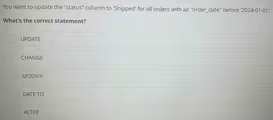
The Correct Answer and Explanation is:
The correct statement is UPDATE.
Explanation
In Structured Query Language (SQL), the UPDATE statement is the correct command used to modify existing data within the rows of a table. It is a fundamental command of the Data Manipulation Language (DML), which is the part of SQL used for adding, deleting, and modifying data.
The task described is to change the value of the “status” column to “Shipped” for all records where the “ORDER_DATE” meets a specific condition. The UPDATE statement is perfectly suited for this. A complete query to accomplish this would look like:
UPDATE orders SET status = ‘Shipped’ WHERE ORDER_DATE < ‘2024-01-01’;
Here is a breakdown of why the other options are incorrect:
- ALTER, CHANGE, and MODIFY: These are Data Definition Language (DDL) commands. DDL commands are used to define or change the structure of the database and its tables, not the data inside them. For example, you would use ALTER TABLE to add a new column, MODIFY to change a column’s data type, or CHANGE to rename a column. Since the goal is to change the data values within the “status” column, not the column’s definition itself, these commands are inappropriate.
- DATE TO: This is not a valid or standard SQL command. It is simply an incorrect option designed to confuse the user.
In summary, the key distinction is between manipulating data (DML) and defining structure (DDL). The question asks to change data values, which is a DML operation. The UPDATE statement is the primary DML command for modifying existing data, making it the only correct answer.