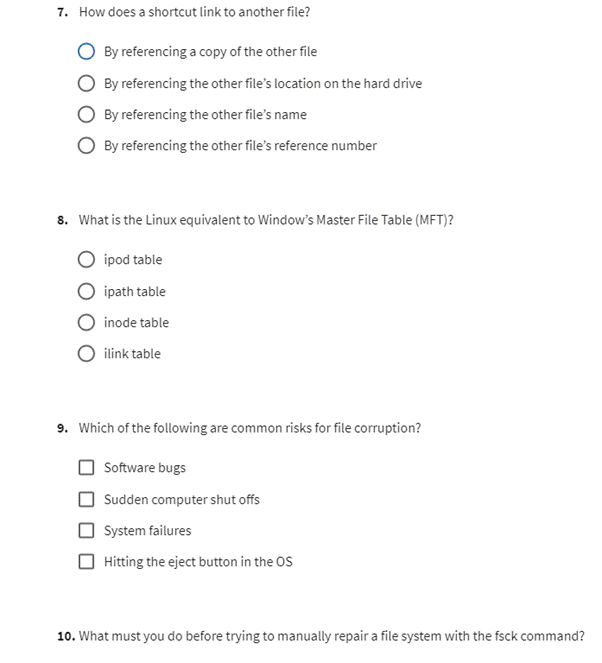
How does a shortcut link to another file? By referencing a copy of the other file By referencing the other file’s location on the hard drive By referencing the other file’s name By referencing the other file’s reference number 8. What is the Linux equivalent to Window’s Master File Table (MFT)? ipod table ipath table inode table ilink table 9. Which of the following are common risks for file corruption? Software bugs Sudden computer shut offs System failures Hitting the eject button in the OS 10. What must you do before trying to manually repair a file system with the fsck command?\r\n10. What must you do before trying to manually repair a file system with the fsck command? Make sure the file system is properly unmounted. Reboot your computer. Run the chkdsk command. Make sure the file system is properly mounted.
The Correct Answer and Explanation is :
Here are the answers to questions 7-10, along with explanations for each:
7. How does a shortcut link to another file?
Answer: By referencing the other file’s location on the hard drive.
Explanation: A shortcut in an operating system typically contains a reference to the location of another file or folder on the hard drive. It doesn’t contain a copy of the file itself, just the file path or location, which allows you to quickly access the original file. This allows for more efficient file management, as you don’t have to keep multiple copies of the same file.
8. What is the Linux equivalent to Windows’ Master File Table (MFT)?
Answer: Inode table.
Explanation: In Linux, the inode table is the equivalent of the MFT in Windows. The inode is a data structure that stores metadata about a file, such as its size, permissions, timestamps, and pointers to the actual data blocks where the file contents are stored. Each file in Linux has an inode associated with it, which allows the operating system to manage files and directories efficiently. Unlike the MFT, which is a centralized database in NTFS, Linux stores the inode information in a distributed manner across the file system.
9. Which of the following are common risks for file corruption?
Answer: Software bugs, sudden computer shut-offs, and system failures.
Explanation: Several factors can contribute to file corruption, including:
- Software bugs: Flaws in the operating system or applications can cause incorrect writes to a file, leading to corruption.
- Sudden computer shut-offs: If a computer loses power or shuts off unexpectedly, files may not be properly saved or closed, leading to incomplete writes and potential corruption.
- System failures: Hardware malfunctions, such as a failing hard drive or corrupted RAM, can also result in file corruption.
While hitting the eject button in the OS (ejecting a device improperly) could cause issues, it isn’t as commonly associated with file corruption as the factors listed above.
10. What must you do before trying to manually repair a file system with the fsck command?
Answer: Make sure the file system is properly unmounted.
Explanation: The fsck (file system check) command in Linux is used to check and repair file system inconsistencies. However, for fsck to work safely, it’s crucial that the file system is unmounted first. Running fsck on a mounted file system can lead to further corruption, as changes made while the file system is in use could conflict with the repair process. You can unmount the file system using the umount command before running fsck. If the file system is the root filesystem, you’ll need to boot from a live CD or use a rescue mode to perform the repair.
Let me know if you’d like further details!